|
Answer» Ok, so my printer has stopped working - sort of. It's a Canon MP620 multifunctional, used with Windows 7. I can still copy, the test page looks fine, but I can't print from my network like I used to.
It all started a few days ago when the ink went dry. I replaced the ink (yellow and the big black one) and tried to print whatever it was that needed to be printed - but only a blank page came out. The computer and the printer is clearly communicating (via my wireless router), as it's actually printing SOMETHING when I TELL it to, it's just that it prints a blank page. It can't be that the ink is the fault - it's the same ink type that all the rest is (while not being Canon's own ink, it's a compatible brand, and it's worked fine so far.)
I started to troubleshoot, to see what was WRONG. I can still copy just fine, as I said, and the test page looks fine (the one to check if the writerhead is working, etc). I MANUALLY reset the networking properties to fabric standard, removed my current drivers and installed the latest ones. Still only blank pages. The test page can still be printed from the computer and still look fine, though. I did this a couple of times with different drivers, but I always got the same result.
A few of the times though, the first line or symbol of a document would be printed, but not the rest of the document (I used different documents all the time). I figured it might be something with the wireless part of it all, so I tried to use the USB-functionality instead - I got the exact same results. Now I'm getting kind of desperate. I don't know much about computers or printers, but I do know some. And now I know that I'm out of ideas. Can somebody please help me?
Thanks in advance!
I made some more "progress" today, here's what I did:
I made a document in Word with only blue text, and that worked fine! So I BOUGHT Canon's own cartridge for the black ink - still the same problem. While I bought the cartridge (a local electronics store) I asked what the problem could be. They thought it might be the compatible ink, and if it weren't it might be some dust or something clogging the printerhead.
I went home, removed all the cartridges, took out the printerhead and looked at it. I have NO idea how one should look, but there was ink on it. I very carefully cleaned it a dry washcloth, as the guy in the store told me to. When I was done I tried the test page again and it still looks the same. I even brought pictures this time, it might help...
This is after first changing the ink (to Canon's own):
http://img.photobucket.com/albums/v225/Sajber/Printer/SCN_0001-00001.jpg (test)
http://img.photobucket.com/albums/v225/Sajber/Printer/SCN_0001-00002.jpg (print)
This is after a normal cleaning with the same ink:
http://img.photobucket.com/albums/v225/Sajber/Printer/SCN_0001-00003.jpg (test)
http://img.photobucket.com/albums/v225/Sajber/Printer/SCN_0001-00004.jpg (print)
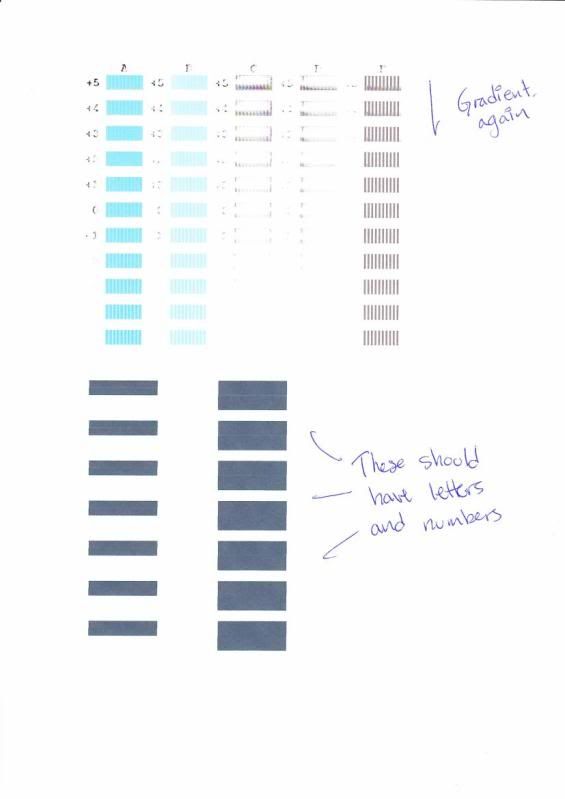
As you can see, there's a pronounced gradient in the black colour. And even though you can't really see it in these pictures, all the other test colours are perfect, as far as I can tell (that is, unless they're supposed to have black mixed in with them as well.) After cleaning I can get it to look better for the first few lines, but then it's as if it gets dirty again. I tried adjusting the writerhead:
http://img.photobucket.com/albums/v225/Sajber/Printer/SCN_0001-00005.jpg (page 1)
http://img.photobucket.com/albums/v225/Sajber/Printer/SCN_0001-00006.jpg (page 2)
The same gradient with the black colour is still there, and after a while there isn't even a bad quality in the black, just no black AT ALL.
What the **** is wrong with my printer?
=(
|